Last updated: November 21, 2026
Quick answer: for most teens, the simplest safe setup is 1 parent-linked account or card, 1 spending app only if needed, and 1 trusted adult who can see activity. Teen money safety and scam response is mostly about a few habits, a few settings, and a fast plan when someone asks for money, codes, or account access. That is the core of this Teen Money Safety and Scam Response Guide.
Key takeaways
- Keep teen money on a short leash: one account, one card, one trusted adult who can see activity.
- Treat any request for a code, gift card, “refund,” or urgent transfer as a red flag; if in doubt, consult a parent, guardian, school counselor, bank, or other trusted professional, and review FTC scam guidance: https://consumer.ftc.gov/scams
- If money is sent to the wrong person, act at once; speed matters more than blame.
- A teen-linked debit card is usually safer than a loose peer-to-peer app for everyday spending.
- The right response to a scam is not to argue with the scammer. It is to freeze, report, and document.
What counts as a money scam for a teen?

A money scam for a teen is any trick that pressures the teen to send money, share login details, or hand over a code. The common thread is urgency: “now,” “right away,” “before the offer expires,” or “to fix a problem.” The FTC’s scam guidance and the FBI’s IC3 reporting system both point to the same pattern: scammers use fear, excitement, and secrecy to rush the victim into a bad move.
The details change, but the targets do not. A teen might be asked to pay a fake seller on a marketplace, “verify” a bank account with a code, forward money for a fake job, or move funds to “protect” them. The request can come through text, DMs, email, game chat, or a call from someone pretending to be a bank, school, or delivery service.
A useful rule is simple: if the message asks for money plus speed plus secrecy, it is dangerous. That rule catches the classic gift-card scam, the fake prize scam, the “wrong number” scam that turns personal, and the “your account will be closed” scam. It also catches the modern version: a scammer who sounds polite, knows a little personal info, and asks for “just one 6-digit code.”
The most important fact for teens is that scams are not only about strangers. A lot of losses start with a fake buyer, a fake seller, or a fake friend account. The account can look real, the profile can have friends, and the message can use the right slang. That does not make it safe.
For a parent or guardian, a better defense is to teach pattern recognition, not just one-off warnings. The teen needs to know that normal businesses do not ask for gift cards, banking passwords, or a code sent to their phone. The FTC explains more consumer scam patterns on its fraud guidance pages, and the FBI’s Internet Crime Complaint Center is the place to report many online money crimes: https://consumer.ftc.gov/scams and https://www.ic3.gov
How should a teen set up money so it is harder to scam?
A teen should keep money in the simplest setup that still works for daily life. A plain setup is easier to monitor, easier to freeze, and easier to explain when something looks wrong. The more accounts, apps, and linked cards a teen has, the more places a scam can land.
The safest base is usually 1 parent-linked account or card, 1 spending app if needed, and alerts turned on. A teen does not need five apps to buy lunch or split a movie ticket. Every extra app adds another password, another recovery email, and another chance to approve the wrong request.
Parent-linked debit card or peer-to-peer app?

A parent-linked debit card is usually the better choice for teen safety, while a peer-to-peer app wins only when the teen truly needs fast person-to-person payments. The card is better because it usually gives clearer guardrails: spending limits, merchant controls, and a single place to watch transactions. An app is faster and more flexible, but that same speed helps scammers move money out of reach.
Here is the practical difference.
| Criteria | Parent-linked debit card | Peer-to-peer app | Winner for this condition |
|---|---|---|---|
| Oversight | Usually easier to review in one bank view | Activity can sit inside the app and email receipts | Card, for parents who want one dashboard |
| Scam resistance | Better for everyday purchases at known merchants | Easier to send money to a stranger | Card, for routine spending |
| Reverse help | Banks may have clearer dispute paths for card fraud | App transfers can be hard to undo once sent | Card, when the payment is unauthorized |
| Speed | Good for stores and online checkout | Very fast person-to-person transfers | App, if the teen must split money quickly |
| Error risk | Lower if the card stays with the teen and alerts are on | Higher because a tap can send money to the wrong name | Card, for younger teens |
| Social pressure | Less pressure to “send now” in chat | Strong pressure when friends ask in a group thread | Card, for teens who feel rushed easily |
| Merchant use | Broad acceptance anywhere cards work | Limited to app users and linked banks | Card, for general use |
| Learning value | Teaches budgeting without giving full cash-like freedom | Teaches digital payment habits, but with more risk | Card, for first-time money management |
| Recovery from theft | Card can sometimes be disabled quickly | App access can be abused if login is stolen | Card, after a phone loss |
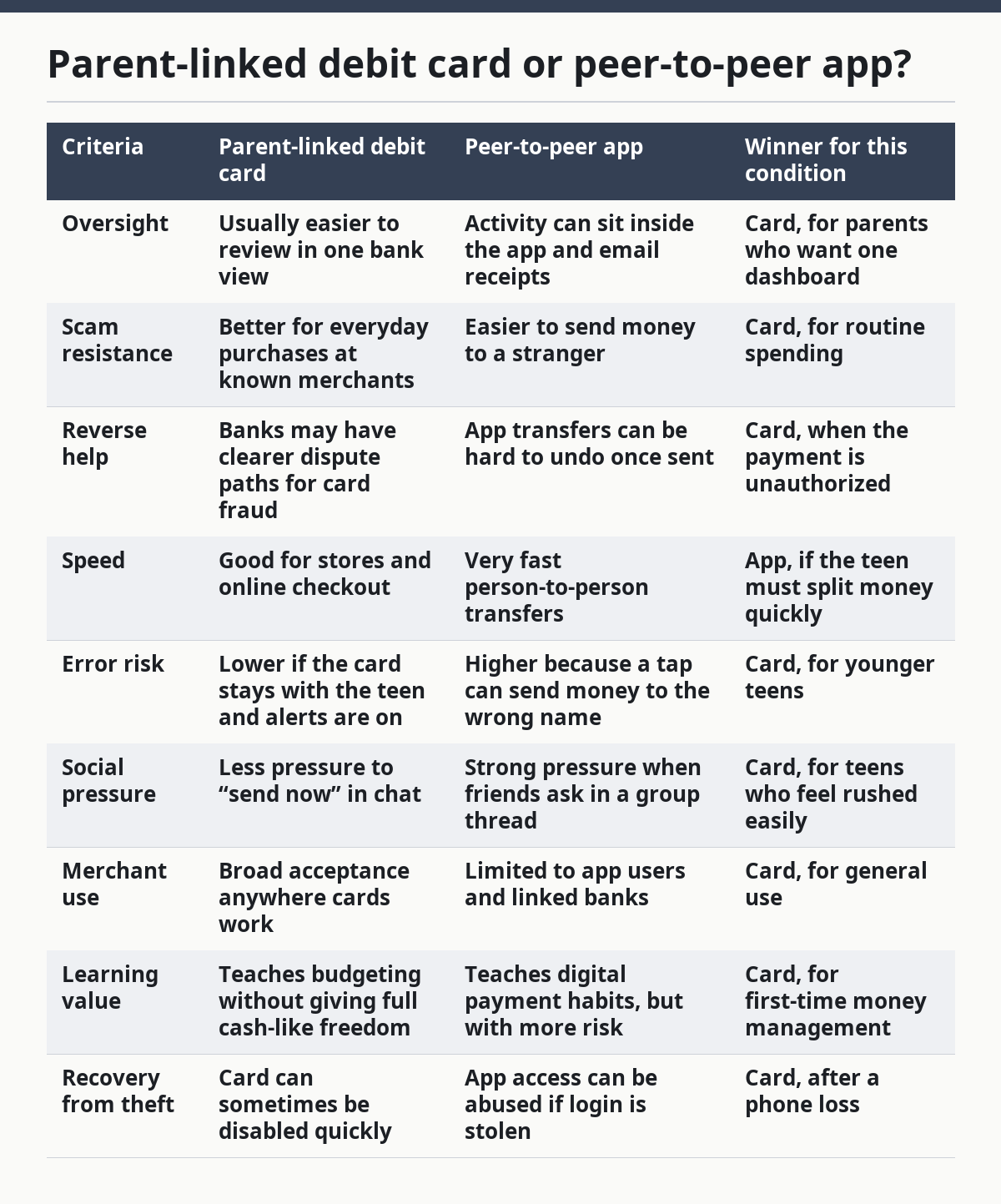
The strongest reason to choose the card first is control. A parent-linked debit card can be paused, checked, and used in a narrower way than many payment apps. That matters because scam losses often happen in a short burst, not over weeks.
The main weakness of a debit card is that it is still a card. If the number is stolen, used on a fake site, or entered into a phishing page, the damage can start quickly. A card also does not stop bad judgment by itself. If a teen shares the card number, the limit does not matter much.
A peer-to-peer app has one real strength: convenience. It works well when a teen needs to pay a friend for lunch, share a ride, or split an approved cost. But that same convenience is why it is riskier. A teen can mistake a fake profile for a real person, and once the transfer goes through, the money may be hard to recover.
If a teen is still learning what scam pressure feels like, the best fit is usually a card, not an app. The best fit for an app is an older teen who already understands how to check names, verify requests out of band, and stop when a message feels off. If the teen still forwards codes to “help” someone, the app is too loose.
What should a teen do in the first 10 minutes after a scam?
A teen should stop the payment, secure the account, and tell a trusted adult in the first 10 minutes. That order matters because the first few minutes are when a bad transfer can sometimes still be blocked, frozen, or flagged. Waiting to “see what happens” is the wrong move.
The response should be short and mechanical:
- Stop replying to the scammer.
- Do not send more money.
- Change the password on the affected account.
- Turn on account alerts if they are off.
- Freeze or lock the card or app if that option exists.
- Tell a parent, guardian, or other trusted adult.
- Save the message thread, username, phone number, email, and payment receipt.
- Contact the bank, card issuer, or app support through the official app or number.
A teen should not delete the conversation, even if it is embarrassing. Screenshots can help show the name used, the time sent, the payment path, and the exact promise the scammer made. A clean record is more useful than a memory.
If a code was shared, the teen should treat that as a sign that the account may be at risk. If the scam involved a login or password, every linked account needs a review. If the scam involved a card number, the card should be locked and replaced if the bank says so. If the scam involved a bank transfer, the bank needs to know immediately because some payment rails move faster than others.
A teen also needs one plain sentence to use with family: “I clicked the wrong thing and I need help now.” That sentence is better than a long explanation. Shame slows reporting, and shame gives the scammer more time.
What should a parent or guardian do next?
A parent or guardian should focus on containment, then recovery, then lessons. The first job is to stop further loss. The second job is to collect facts. The third job is to set a rule so the same mistake is less likely next month.
Containment starts with the payment method. If the loss involved a card, the issuer may need to block it. If it involved an app, the app account may need a password reset, device sign-out, or transfer dispute. If the teen gave out bank details, the bank should be contacted right away using the number on the card or the official website, not a phone number from a text.
Recovery means documenting everything in one place. Keep the date, the amount, the payment method, the username, the phone number, the email address, and the wording of the scam message. If the bank asks for a timeline, that record saves time. If police or a fraud unit need a report, the record saves the same facts from being repeated badly.
The lesson should be specific, not vague. “Be more careful” is too soft to be useful. A better rule is “Never send money to someone who refuses a call,” or “Never share a code, even with someone who says they are from the bank.” A teen can remember a hard rule. A teen cannot use a cloudy one when a message flashes on screen.
This is also the point to review the payment setup. If the teen is still getting phished, a looser app may be the wrong tool. If the teen is constantly asking for help with cash, the system may need a lower limit, a second approval step, or fewer linked accounts. A short policy beats a dramatic lecture. For a practical checklist, the FTC scam pages and the FBI IC3 portal are useful references: https://consumer.ftc.gov/scams and https://www.ic3.gov
Which money setup wins for most teens?
A parent-linked debit card wins for most teens because it gives enough freedom for normal spending without handing over the full speed of a cash-like app. That balance matters. Teen money safety is not about banning every tool; it is about giving just enough access to learn without making a scam easy.
The debit card is best for the teen who is still building habits: checking balances, reading merchant names, waiting before sending money, and asking before acting on a strange request. It is also the better choice when the family wants one place to monitor spending and one button to lock the card if something feels off.
The app is best for a narrow use case. It fits an older teen who already knows the person on the other end, understands that usernames can be copied, and can verify requests outside the chat before sending money. The app is not the right first tool for a teen who gets nervous under pressure or likes quick deals online.
The biggest downside of choosing the card is that it can feel slower and less social. Teens may complain that they cannot instantly pay friends the way they want. That complaint is real, but it is not a strong reason to make the account looser than necessary. Speed is not a safety feature.
The biggest downside of the app is that it can make a bad decision feel casual. One tap can send money to a stranger, and one fake screenshot can make a scam look normal. A teen who is still learning should not be given a tool that rewards rushing.
When does the advice change?
The advice changes when the teen is buying from strangers, sending money in a game, or using a shared device. Those cases raise the risk enough that the safer choice can flip or the account setup needs extra limits.
The first exception is online resale. If a teen is buying concert tickets, sneakers, or a used phone from someone they do not know, the best answer is often not to use a peer-to-peer app at all. A card-backed purchase path with stronger dispute options is usually safer than sending money as if the seller were a friend. A fake seller can vanish in one message thread.
The second exception is family money transfer. If a teen is sending money to a parent, sibling, or another known person, an app can be fine if the identity is confirmed outside the chat. A simple phone call or voice note can stop a look-alike account from fooling anyone. The transfer is safer when the teen knows exactly who is asking and why.
The third exception is device compromise. If the phone itself may be infected, lost, or shared, neither option is safe until access is cleaned up. A stolen passcode or shared fingerprint can defeat both a card app and a payment app. In that case, the account lock and password reset matter more than the payment choice.
The fourth exception is a teen who cannot yet spot pressure. If the teen has already fallen for a fake shipping fee, a fake prize, or a “verify this code” request, the setup should get stricter, not looser. That may mean fewer apps, lower limits, or full adult review before new payees are added. A looser system is the wrong fix for a teen who is still guessing.
How can a teen spot a scam before any money moves?
A teen can spot most scams before money moves by checking for urgency, secrecy, and payment weirdness. Those three signs show up again and again. If a seller wants gift cards, a “verification” fee, a code, or a move to another app fast, the message deserves a hard stop.
The easiest pre-check is to slow the conversation down. A real seller, bank, or school office can wait a minute. A scammer usually cannot. Ask for the full name, a callback number found on an official site, and a second channel for confirmation. If the person refuses, that is the answer.
Another useful check is the money path itself. A normal purchase should make sense for the item. A stranger asking for a payment method that offers little protection is a warning. A request to “send it now and I’ll explain later” is not a shortcut; it is a trap.
Teens should also watch for copied voices, copied names, and copied screenshots. Scammers know that a convincing display can feel more real than the facts behind it. That is why a direct check outside the chat matters. One call, one text to the real contact, or one visit to the official app can cut off the scam.
For more on how fraud shows up in real consumer complaints, the FTC’s scam pages and the FBI IC3 reporting portal are good public references: https://consumer.ftc.gov/scams and https://www.ic3.gov
What if the scam already took the money?
If the scam already took the money, the next move is still to report it fast and ask the payment provider what can be reversed. The money may be hard to recover, but some actions are time-sensitive and worth taking right away.
The bank, card issuer, or app support team needs the exact amount, the time, the recipient name, and the method. The teen or parent should ask whether the payment was authorized, pending, or completed, because the answer changes what can happen next. A pending transfer may be handled differently from a completed one.
The fraud report should include the scam context, not just the amount. “Fake seller,” “romance pressure,” “bank impersonation,” and “gift card request” are useful labels. They help the support team sort the case and may matter if the scam connects to a known pattern.
The teen should also protect the rest of the money. Change the password, review linked devices, and remove saved payment methods that are not needed. Because the email password can be the reset door for everything else, protect that account first if it looks compromised. If the same login is used for email, school, and banking, the email account may be the real weak point. Once email is compromised, password resets get easier for the wrong person.
One hard truth is that not every loss comes back. A plain plan works better than false hope. The goal is to stop the spread, file the report, and prevent the next loss. That is still a win, even if the first transfer cannot be reversed.
What should a teen remember on a bad day?
A teen should remember three things on a bad day: stop, tell, and save proof. Those three steps are enough to cut the damage from a lot of scams. They are also simple enough to remember under stress.
Stop means no more replies, no more taps, and no more transfers. Tell means a trusted adult right away, not after school, not after dinner, and not after “just one more message.” Save proof means screenshots, usernames, payment receipts, and call logs before anything disappears.
The best teen money safety plan is not complicated. It is a low-friction setup, clear limits, and a short response plan when someone tries to rush the teen into acting. A card with controls usually beats a flexible app for younger or newer users. A careful adult review beats a private struggle every time.
What questions do parents ask most often?
Is a teen ever safe sending money to a stranger online?
A teen is not truly safe sending money to a stranger online, even if the profile looks real. Fake sellers can copy photos, names, and reviews in a way that looks convincing on a phone screen. If the payment method does not offer strong dispute options, the risk goes up fast.
What is the biggest red flag in a scam message?
The biggest red flag is urgency tied to secrecy or payment. If someone wants money now, wants the teen to hide it, or wants a code sent over, the message should be treated as dangerous. Real businesses do not need panic to do business.
Should a teen use the same password for money apps and email?
No, a teen should not use the same password for money apps and email. Email is often the reset door for everything else, so one stolen password can spread into several accounts. A separate password and account alerts give better protection than one reused login.
What if the scammer already knows my teen’s name and school?
That does not make the message safe. Scammers often gather basic facts from public profiles and old leaks to sound believable. The right response is still to verify the request outside the chat and refuse any pressure to act fast.
Should a teen keep money in cash instead?
Cash can help with small, local spending, but it does not solve scam risk by itself. Cash is hard to reverse, hard to track, and easy to lose. A controlled debit setup is often safer for everyday use because it leaves a record and can be locked faster than a wallet.
Drafted with AI; not yet reviewed by a person.