Last updated: November 20, 2026
Quick Answer: In most teen bank accounts, you can find pending card charges in the card activity or recent transactions area, and they often appear within minutes to a few days depending on the merchant.
A teen bank account can show a pending card charge before the merchant finishes the sale, and the fastest way to find it is in the debit card transaction list or recent activity.
Look for the authorization hold first.
The steps below show where to check, what the charge means, and when a pending amount turns into a posted charge.
Key Takeaways
- Pending charges are not the final version of a purchase.
- The amount can change before it posts, especially with tips, gas, or hotel stays.
- A pending charge can lower your available balance right away.
- If you only look at posted transactions, you can miss the charge for a day or two.
- The merchant controls much of the timing, not the teen banking app.
Find the pending charge in the teen banking app

You can usually find a pending card charge in the card activity screen, not the bill-pay area or transfer history. Picture this: you’ve just bought lunch, the receipt says one amount, and your app shows a different number in the card section a few minutes later.
Open the teen banking app, tap the debit card or account tied to the purchase, and look for recent card activity or pending transactions. That is where an authorization hold usually appears. If the app splits activity into tabs, check both pending and posted. Some apps show the hold in the same feed as completed purchases, but with a different label.
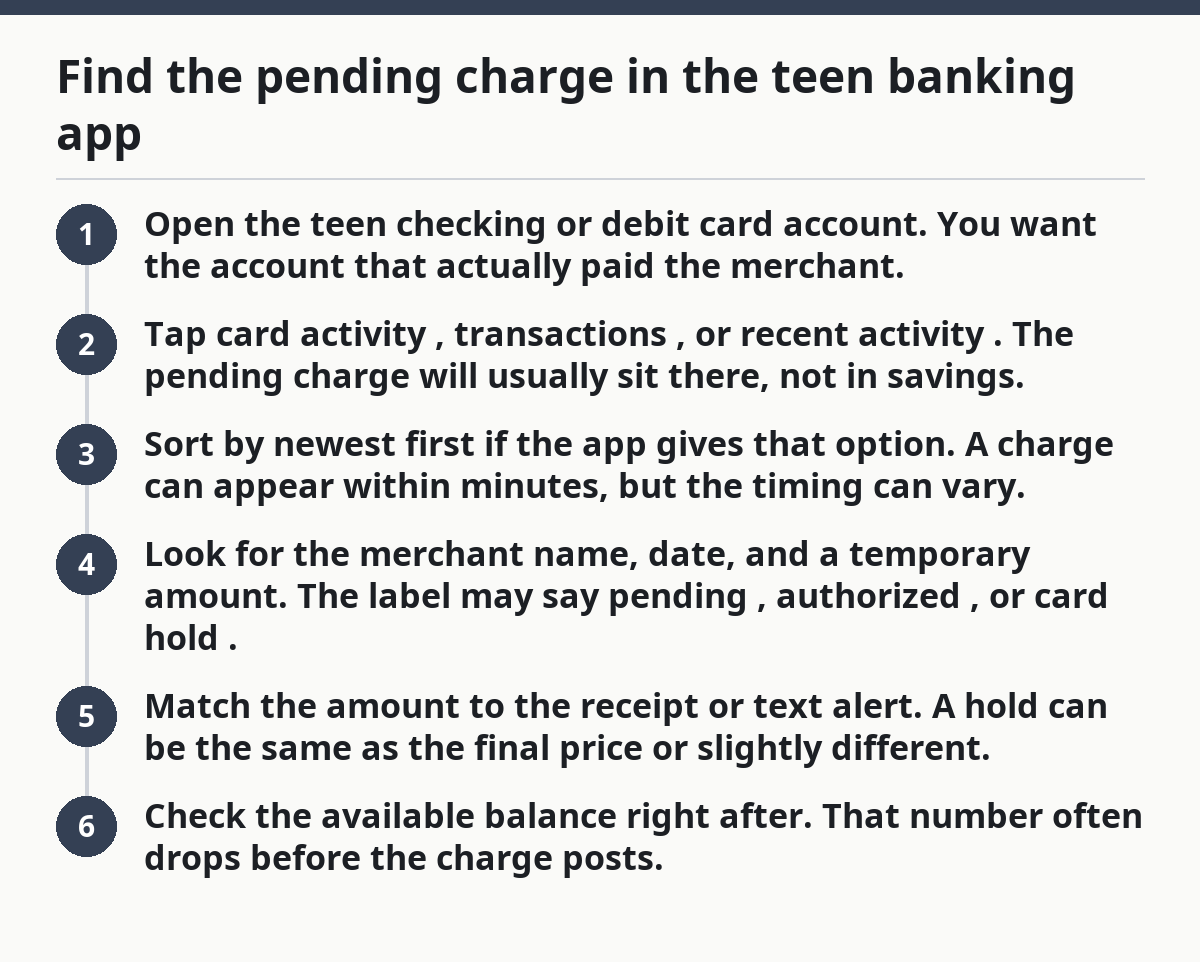
Next, use this order:
- Open the teen checking or debit card account. You want the account that actually paid the merchant.
- Tap card activity, transactions, or recent activity. The pending charge will usually sit there, not in savings.
- Sort by newest first if the app gives that option. A charge can appear within minutes, but the timing can vary.
- Look for the merchant name, date, and a temporary amount. The label may say pending, authorized, or card hold.
- Match the amount to the receipt or text alert. A hold can be the same as the final price or slightly different.
- Check the available balance right after. That number often drops before the charge posts.
Here’s the catch: a pending charge may appear under the merchant’s legal name, not the store sign you saw. A coffee shop might show the company name that owns it, and that can make the charge look unfamiliar at first.
What a pending card charge means in plain English
A pending card charge means the merchant has asked the bank to reserve money, but the sale is not fully settled yet. Picture this: you swiped or tapped your card, the cashier said “approved,” and now the bank is waiting on the merchant to finish the transaction.
A pending charge is often called an authorization hold. The bank sets aside the amount so the same money can’t be spent again. That hold can last less than a day for some purchases or several days for others, depending on the merchant and the payment type.
This is why the number in the app may not match the final charge. The merchant can change the amount before posting when there is a tip, a fuel hold, a restaurant adjustment, or a split payment. If you bought something for $18 and left a tip, the posted charge may end up higher.
The truth is, pending does not mean wrong. It means unfinished.
Common places where pending charges behave differently:
- Restaurants: a tip can change the final amount after the card is run.
- Gas stations: a pump may place a larger temporary hold than the final fuel cost.
- Hotels and car rentals: the merchant may keep an extra hold for damage or incidentals.
- Split transactions: one purchase may appear as more than one authorization if the merchant breaks it into parts.
- Online orders: a merchant may authorize one amount now and capture the payment later.
If the app shows only one number and no detail, the merchant name and the word pending are often the clearest clues that the charge is still moving through the system.
Why the available balance drops before the charge posts

Your available balance drops because the bank counts the pending charge as money you can’t spend twice. Picture this: you had $50, bought a $12 sandwich, and the app now shows less than $50 even though the purchase is still pending.
This is the number that matters for day-to-day use. The available balance is what you can use right now. The current balance may still include money that is already on hold but not yet fully posted. Some apps show both, and that can confuse teens who expect one number to do the whole job.
That gap matters if you are trying to buy something else the same day. A pending $20 charge can make it look like you have less money left than the “real” balance on paper. That is not a bank error. It is the hold doing its job.
Watch for these patterns:
- A small purchase can lower available funds by the exact amount.
- A restaurant charge can change later because of a tip.
- A larger hold can stay in place for a few days before it clears.
- A declined second purchase may happen if the available balance is too low, even when the current balance looks fine.
If the app only shows the posted balance, check the card activity screen. That is where the temporary hold usually lives. It is also the place to spot whether a charge is still pending or has already become final.
How to tell a pending hold from a posted charge
A pending hold usually has a temporary label, while a posted charge looks final and no longer says pending. Picture this: the same merchant appears twice in your account over two days, and you need to know which line is the real charge.
The easiest clue is the status. A pending item may say pending, authorization, processing, or card hold. A posted charge usually appears without that tag and may move from the pending section into the completed activity list.
A few signs help:
- The pending amount may not match the receipt yet.
- The posted charge usually has the final amount.
- A pending item can disappear and reappear as the final charge posts.
- A restaurant or hotel charge may start one way and finish another.
- A merchant can use a slightly different name at posting than at authorization.
Some banks also show a transaction timeline. That helps when you need to trace the charge from the tap or swipe to the final debit. If your teen banking app includes that view, use it. It is the cleanest way to see whether the card was authorized, captured, and posted.
On the flip side, do not assume every pending charge will stay visible in the same place. Some apps move older holds out of the main feed once they are finalized. If you wait too long, the pending line may be gone and only the posted charge remains.
What to do if the charge is missing or looks wrong
If the charge is missing or looks wrong, first check the merchant name, the timing, and whether the purchase was made with the same card. Picture this: you know you paid, but the app shows nothing, or the amount looks off by a few dollars.
Start with the purchase details you can see:
- Look at the receipt for the exact time and amount.
- Check whether the card used was the teen debit card or another payment method.
- Refresh the app and sort by newest activity.
- Search for the merchant name, not just the store name.
- Wait a little if the purchase was made late in the day, since some authorizations show up after the merchant batch closes.
If the charge still does not appear after a reasonable delay, or if the amount is clearly different from the receipt, the next step is to compare the pending hold with the final posted amount. Restaurants, tips, gas pumps, and hotel desks are the most common places where the first number is not the last number.
This page is about finding and reading pending charges, not disputing them. If a charge is unfamiliar or unauthorized, use the separate help page for that issue. That keeps the problem clear and avoids mixing a timing delay with a true account error.
Most pending-charge confusion clears up once you know where the app stores the card history.
How long does a pending card charge stay there?
A pending card charge usually stays until the merchant completes the sale, and that can be minutes, days, or longer depending on the type of purchase. Picture this: you see the hold on Friday, then the posted charge on Monday, and you wonder what happened in between.
There is no single timer that fits every merchant. A tap at a grocery store may post quickly. A hotel, car rental, or restaurant tip can take longer because the final amount is not settled right away. Online orders can also sit in pending status until the merchant captures the payment.
The practical rule is simple: if you see the hold, treat that money as spoken for, but if you have questions about your account, consider checking with your bank or a qualified financial professional. The Consumer Financial Protection Bureau explains debit card holds, and the Federal Reserve explains how card transactions can post later than the authorization.
If the same pending charge sits much longer than you expect, check the merchant’s name and the card activity again before assuming anything is broken. Timing issues happen more often than people think.
FAQ
Why is a card charge pending?
A card charge is pending because the merchant asked the bank to reserve the money before the sale was fully settled. The charge may stay pending while the merchant finishes the transaction, adds a tip, or sends the final amount to the bank.
How do pending charges affect my balance?
Pending charges lower your available balance right away, even though they may not yet be posted. That means the money is already set aside, so another purchase can fail if you try to spend it twice.
When does a pending charge disappear?
A pending charge disappears when it posts, drops off after a failed authorization, or is released by the merchant or bank. The timing depends on the merchant and the type of purchase, so some holds clear quickly while others take a few days.
Drafted with AI; not yet reviewed by a person.