Last updated: November 20, 2026
Quick Answer: Most teen bank account personal information updates take 5 minutes in the app when the bank allows self-service, but legal name corrections usually need a parent or bank representative.
This guide explains How Teens Can Update Personal Information on a Teen Bank Account for a mailing address, phone number, email address, or legal name, and it shows when to use the bank app versus a bank branch.
A teen bank account profile can usually be updated for a mailing address, phone number, or email address, but a legal name correction often needs a parent or bank representative.
The exact path depends on what you’re changing and how the bank set up teen access.
The steps below show what you need first, what to tap in the bank app, and when to use a bank branch instead.
Key Takeaways
- Simple contact details are often easy to change in-app, but profile edits tied to identity need backup.
- A mailing address change can affect statements, notices, and debit card mail, so check every screen before you save.
- A phone number update may change where verification texts go, which can lock you out if you skip a step.
- A wrong legal name is not a typo you brush off; it usually needs a parent or bank staff to fix.
- If the teen profile is linked to a parent or guardian, one adult may have to approve the change in the same visit or call.
What you need before you start
You need the current login for the teen bank account profile, the new contact detail, and any proof the bank asks for. That proof can be a utility bill, school document, government ID, or a parent’s confirmation, depending on the bank’s rules.
The catch is that a teen profile is often a shared setup, not a stand-alone login. If the bank ties the teen’s access to a parent or guardian profile, some edits take 5 minutes in the app and others need a call or branch visit.
- Have the current phone number ready if the bank sends a code there.
- Know the exact new mailing address, including apartment number and ZIP code.
- Use the legal name on the school ID, birth record, or other document if that is what the bank asks for.
- Ask the parent or guardian to be available if the profile shows shared controls.
The Federal Deposit Insurance Corporation explains how account records, identity checks, and contact details affect banking access in general, and the Consumer Financial Protection Bureau has plain-language guidance on bank account problems and identity verification. Those pages are useful background if a bank asks for documents you were not expecting.
FDIC: https://www.fdic.gov/
CFPB: https://www.consumerfinance.gov/
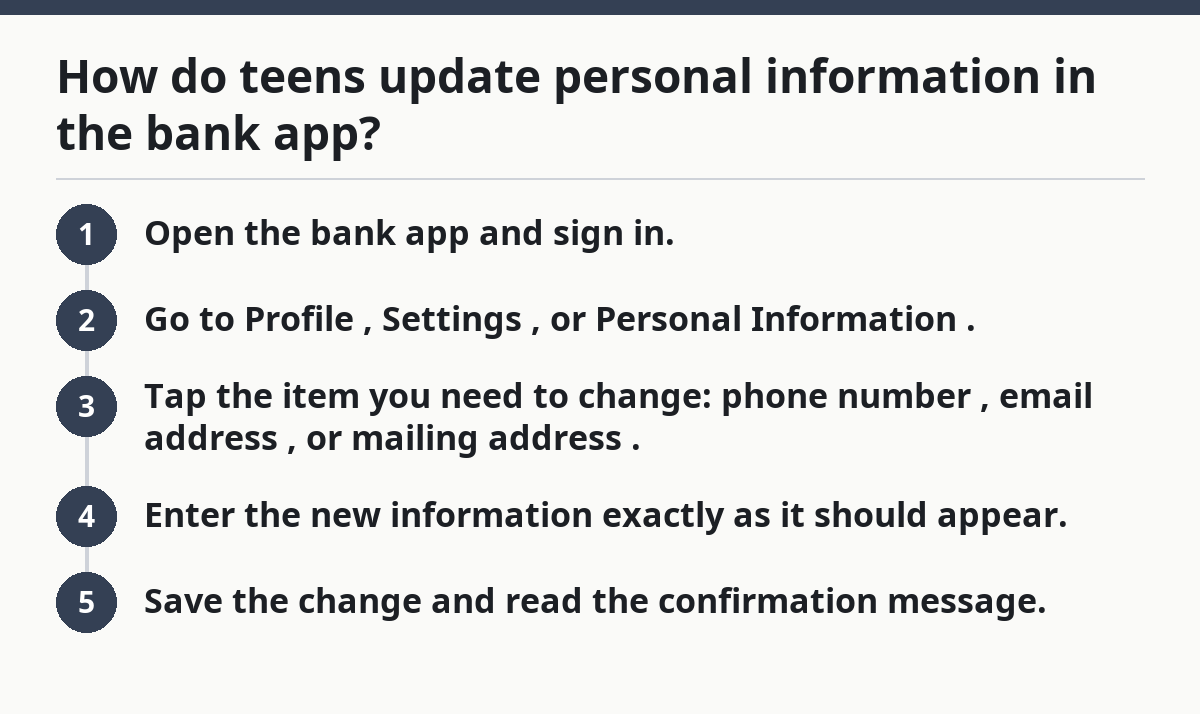
How do teens update personal information in the bank app?
Teens can often update a phone number, email address, or mailing address in the bank app if the bank allows profile edits from the teen side. The change usually appears in the profile, settings, or personal information menu, and you should see a confirmation screen before you leave.
If the teen bank account app allows edits, the fastest path is usually inside the profile menu. The bank app may let you change one field in about 5 minutes, then show a confirmation screen before you exit.
- Open the bank app and sign in.
- Go to Profile, Settings, or Personal Information.
- Tap the item you need to change: phone number, email address, or mailing address.
- Enter the new information exactly as it should appear.
- Save the change and read the confirmation message.
You should see a success notice, a verification prompt, or a “pending review” message. If the app returns you to the old screen without a message, the update probably did not go through.
- A phone number change may trigger a code to the old number or the new number.
- An email address change may need a click on a confirmation link.
- A mailing address change may ask for a reason, like a move or corrected ZIP code.
- A profile that says “contact bank” or “parent approval needed” means the app alone will not finish the job.
Some banks let teens edit contact details only after a parent approves the same request. That can make a 2-minute update turn into a same-day task if the adult is not nearby.
Which personal information can a teen change alone?
A teen can usually change contact details alone only when the bank treats those fields as low-risk profile edits, but bank rules vary. That often includes an email address, a mobile number, or a mailing address, but not a legal name or identity record.
If you are trying to update a teen bank account, check each field separately. One bank may allow a mailing address edit, while another requires a parent call or branch visit for the same field.
- Email address: often self-service if the bank only needs a confirmation email.
- Phone number: sometimes self-service, sometimes tied to security checks.
- Mailing address: sometimes editable in-app, but some banks require proof of residence.
- Display name or nickname: may be editable, but this does not change the legal name on records.
The truth is, banks separate convenience from identity. A nickname in a profile is not the same thing as a legal name in bank records, and that difference is where a lot of teen updates get stuck.
Use the app field carefully:
- If the screen says “preferred name”, that is not a legal correction.
- If the screen asks for a verification code, finish that step before logging out.
- If the bank sends a message about parent approval, stop and involve the adult before trying again.
A teen who changes a phone number without finishing verification can get trapped outside the app. That is a common mistake, not a rare one.
How do teens update a mailing address without closing the account?
A teen can often update a mailing address without closing the teen bank account, as long as the bank allows address edits on the profile and does not require a full re-verification. The update usually stays inside the same account and changes where statements, alerts, or debit card mail go.
If you moved and still use the same bank, the mailing address is usually the field to update first. The bank may keep the account open and just change where mail and notices go.
- Open the bank app or sign in on the bank’s website.
- Find Address, Contact Info, or Personal Details.
- Enter the full mailing address exactly, including apartment or unit number.
- Check whether the bank asks for proof, such as a document with the new address.
- Save the change and wait for the confirmation message.
You should see the new address in the profile after you save. If the app says the change is pending, check again later or call the bank to ask whether a review is in progress.
A few banks still want a bank branch visit for address changes on teen profiles, especially if the account is linked to a parent or the address change arrives at the same time as another update. That can happen when the bank treats the address as part of its identity checks.
- Bring a document that shows the new address if the bank asks.
- Ask whether debit card mail will go to the updated address right away.
- Ask whether statements and notices switch immediately or after the next cycle.
- If the teen profile is shared, make sure the parent or guardian knows the address was updated.
Some banks split paper mail, digital alerts, and card mail into separate settings, so one address change may not update every delivery path.
What if the phone number or email address changes?
A teen can update a phone number or email address if the bank allows that field in the profile, but the change may affect login verification and alerts. The bank may send a code, a link, or both, and the old contact method may stop working once the update is saved.
If the phone number or email address changed, the teen bank account may need a verification step before the new contact detail becomes active. In many cases, the bank app shows that step right after the edit.
- For a phone number, watch for a text code sent during the update.
- For an email address, look for a confirmation email before the new address becomes active.
- For both, save screenshots of the confirmation screen if the bank gives one.
- If the old number is dead, call the bank or visit a bank branch instead of guessing.
The reason this matters is simple: verification tools often use the contact details you are trying to replace. If you switch the number first and never finish the code step, the bank may still expect a code from the old line.
If the teen profile shows an old phone number but the phone itself has changed, update the number first, complete the verification, and then test the sign-in alert or message feature once the new number is active.
- If a code never arrives, check the number format, roaming status, and message-block settings.
- If the new email lands in spam, mark the bank as safe before trying again.
- If alerts stop after the update, turn them back on in the alert menu.
This section is also why the teen banking safety guide matters; the hub on Teen Banking Account Safety and Access helps explain the login side without turning this page into a password or two-factor guide.
When does a parent or bank representative need to step in?
A parent or bank representative needs to step in when the change affects legal identity, account control, or a verification rule the teen cannot bypass. That usually means a legal name correction, a document mismatch, or an address change that the app rejects.
If the bank blocks the edit, that usually means the teen bank account field is treated as official recordkeeping. In that case, the bank may require a parent, guardian, or representative to finish the update.
- A legal name is wrong on the teen profile.
- The bank needs to match the profile to a school record, ID, or other document.
- The system says parent approval required.
- The app shows contact the bank instead of a save button.
For a legal name correction, the bank may ask for a parent or guardian to confirm the request and may want supporting documents. That is not the same as changing a display name in the app.
- Bring the document the bank asks for, not a random substitute.
- Ask whether the correction changes statements, debit card printing, or both.
- If the bank has a bank branch option, ask whether the adult must come in person.
- If the parent is the primary contact, ask whether the teen can still sign in after the change is made.
Honest limitation: if the teen’s profile is part of a family-linked setup, a bank representative may be the only person who can finish the edit. That is a bank rule, not a user mistake.
Common mistakes that delay teen profile updates
A teen can get a profile update rejected by using the wrong field, skipping verification, or mixing up a nickname with a legal record. Those mistakes cost time because the bank may put the request on hold, send it back, or ask for proof later.
If the change is small, the delay can still matter because the teen bank account may send statements or verification codes to the wrong place. A mismatch of one field can create a longer support call later.
- Changing the wrong field. A preferred name is not the same as a legal name.
- Leaving out unit numbers. Missing apartment or suite details can send mail to the wrong place.
- Skipping verification. Some changes stay pending until a code or link is completed.
- Ignoring parent approval. Shared teen profiles often pause until the adult confirms.
- Updating one contact method and forgetting the other. A new phone number with an old email can still cause confusion.
A better move is to read every confirmation screen slowly, even if the update looks routine. That final screen often tells you whether the change is complete, pending, or blocked.
If the app gives you an error code, write it down before you close the screen. Bank support can use that detail, and it saves you from repeating the whole form.
FAQ: teen bank account profile changes
Can a teen change an address without closing the account?
Yes, in many cases a teen can change a mailing address without closing the teen bank account. The bank usually keeps the same profile and just updates the contact record. If the app rejects the change, the bank may want proof of residence or a parent’s approval.
Does changing a phone number affect login verification?
Yes, changing a phone number can affect login verification. The bank may send security codes or alerts to the new number once it is saved, and sometimes to the old number during the switch. If the old number no longer works, a bank branch or support call may be the cleanest fix.
What if the legal name on the account is wrong?
The legal name usually needs a bank representative and often a parent or guardian to fix. A teen can’t usually solve that with a nickname edit in the app. Bring the document the bank asks for, because a legal correction is treated as a record change, not a quick profile tweak.
Drafted with AI; not yet reviewed by a person.