Last updated: November 21, 2026
Quick answer: do 5 things right away. If a text claims to be from a bank and mentions a teen bank account, treat it as a phishing scam until you verify it through the bank’s app or a known support number. For What Teens Should Do If a Scam Text Mentions Your Teen Bank Account, the safest next move is usually to save the message, block the sender, and contact bank support through a number you already trust.
Key takeaways
- A bank text can look real and still be fake, especially if it asks for a verification code or a quick tap.
- Never send back a code, password, or one-time passcode from a text message.
- Do not call the number in the text or tap the link just to “check.”
- Use the bank app, the number on the back of the card, or the official bank website to verify the message.
- If the text already touched account security, act fast with bank support and change passwords from a safe device.
What should you do first?
The first thing to do for What Teens Should Do If a Scam Text Mentions Your Teen Bank Account is stop interacting with the text message and check the claim through the bank itself. A scam text often creates panic with words like “locked,” “suspended,” or “verification needed,” but the message is only a lure until you confirm it through bank support.
Use this 5-step order:
- Do not tap anything in the text. Links in phishing texts can lead to fake login pages or malware. The result you want is simple: no extra risk from the message itself.
- Do not reply with any code. A verification code is meant for you alone, not for a person in a text thread. If the text asks for a code, treat that as a red flag and verify it through bank support or a trusted adult.
- Open the bank app yourself. Type the app name or use the app you already have, rather than opening a link in the message. Look for alerts inside the app, where the bank can post real account notices.
- Contact bank support using a trusted number. Use the number on the back of the card or the bank’s official site, not the one in the text. A real support team can often tell you whether the message matches any account issue, and if needed you can confirm with a parent, guardian, or another trusted adult.
- Save the text before deleting it. Keep the sender name, phone number, time, and any link visible. That helps bank support and can help if the scam is reported later.
If the message says your teen bank account is frozen, overdrawn, or in review, do not panic into acting inside the text thread. A real bank should not need you to prove yourself by text reply alone.
Why does a text mentioning a teen bank account feel real?
A text mentioning a teen bank account feels real because it uses account language, time pressure, and a known brand to sound official. Scam texts often copy the tone of bank alerts so a teen reacts before checking the facts.
That works because the message often includes one or more of these hooks:
- A fake warning about “unusual activity”
- A request for a verification code
- A link that looks like a login or “secure check”
- A fake support number to call right away
- A short deadline, such as “act now” or “account will be closed”
The trick is that none of those details prove the message is real. A scammer can use a bank name, a clean-looking format, and a number that looks local. The message may even arrive in the same style as a real bank alert, which is why the source matters more than the wording.
A good rule is this: a real bank text can inform you, but it should not pressure you to hand over a code or password in under 1 minute. If the text asks for private details, that is not routine account security. It is a sign to stop and verify through a trusted channel.
For plain guidance on phishing and fake account messages, the Federal Trade Commission’s consumer advice on phishing is a useful reference: https://consumer.ftc.gov/articles/how-recognize-and-avoid-phishing-scams. The Consumer Financial Protection Bureau also has bank-account safety guidance that fits this situation: https://www.consumerfinance.gov/consumer-tools/bank-accounts/.
What should a teen never send back?

A teen should never send back a verification code, password, PIN, or one-time login code to a text message sender. Those are the exact details a scammer wants because they can open the door to account access.
The most common mistake is to think, “I can just send the code and be done with it.” That can cost access to the account or let someone reset login details. Another mistake is sharing the last four digits of a card, a full phone number, or a screenshot of the app screen if the text asks for “proof.”
Do not give away:
- A verification code
- A password
- A PIN
- Security answers
- Card numbers
- A screenshot with balances, card details, or login prompts
If a person on the phone or in text says they are bank support and asks for the code “to verify your identity,” stop there. Real bank support can often verify you with known account questions or by using the bank’s own secure systems, not by asking you to hand over the code first; when in doubt, verify with bank support or a trusted adult.
This is one place where caution has a cost, but the cost is small: a few extra minutes to verify. The cost of being fast is much bigger.
How do you verify the message without making things worse?
You verify the message by leaving the text thread and checking the bank through a trusted path. That keeps you away from fake links and fake support numbers while still answering the only question that matters: is there a real account problem?
The safest way is to use this order every time:
- Open the bank app directly. Look for alerts, sign-in notices, or messages inside the app.
- Call the number you already trust. Use the number on the back of the card or on the official bank website.
- Ask whether the text matches a real notice. Give the sender number and the exact wording of the message.
- Check for account changes. Look for password resets, new devices, or transfers you did not make.
- Leave the text open until you finish. That keeps the sender, time, and wording visible if support asks about it.
Do not search the bank name in a browser and click the first result if you are stressed. Scam ads and look-alike sites can show up near real results. If a teen bank account is at the center of the message, the bank app or a known phone number is safer than a search box.
If the text claims there is a problem and then tells you to “verify” through a strange link, that is a strong sign of phishing. A real bank may send a text alert, but it should not require you to hand control to the sender.
What if the text uses a fake support number or link?
The text is almost certainly a scam if it pushes a support number or link that does not match the bank’s official contact details. Fake support numbers are a common trick because they sound helpful while sending you straight to the scammer.
Compare the options like this:
| Choice in the text | Risk level | Better move |
|---|---|---|
| Tap the link in the text | High | Use the bank app or official website instead |
| Call the number in the text | High | Use the number on the card or official site |
| Reply with “yes” or a code | High | Do not reply; verify through bank support |
| Ignore the text and do nothing | Medium | Save it, then verify if the message mentions an account issue |
| Contact bank support through a trusted number | Low | Best next step |
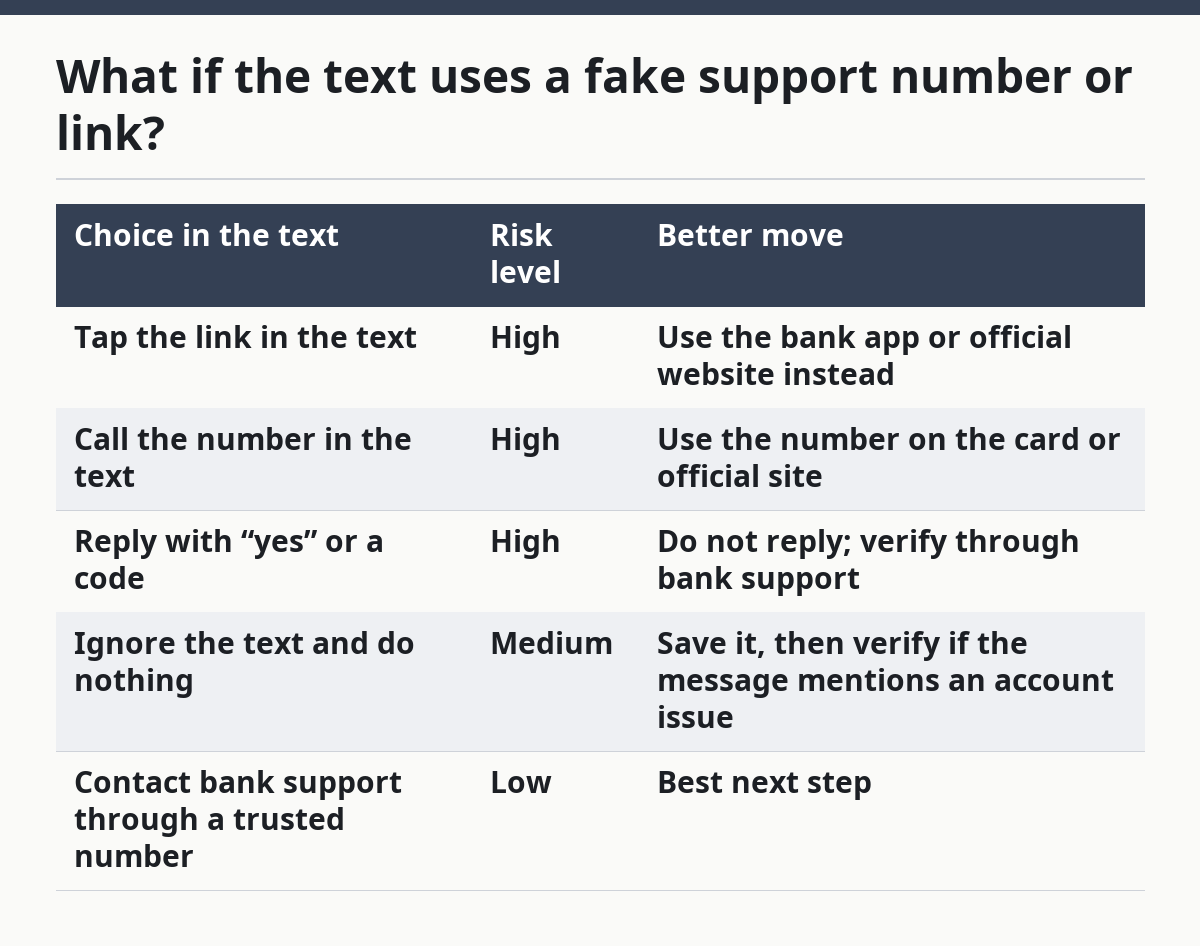
A fake support number can keep you talking long enough to collect details. A fake link can also look polished on a phone screen, where the address bar is small and easy to miss. That is why the safest path is to avoid both until you check through the bank itself.
If a teen already called the number in the text and shared a code, the next move is to contact bank support right away through a trusted number. Do not wait to see what happens next. Time matters when account security is involved.
What if the text mentions money movement or card trouble?
If the text mentions a transfer, debit card issue, or account hold, the right move is still to verify through bank support first. The scam may be built around fear of losing access to money, but the goal is to get you to act before you think.
A teen should look for these warning signs:
- The message says the account will be closed today
- It asks for a code “to stop the freeze”
- It asks for a card number to “reverse” a charge
- It tells you to move money to another account
- It says support can only be reached through the text
That last point matters. Real bank support does not need to hide behind a random text thread. If the text asks you to move money, log in from a link, or send details fast, treat it as a phishing scam until proven otherwise.
If there is any chance the teen bank account was already touched, the account holder should change passwords from a device they trust and use the bank’s secure channels to review activity. This is financial safety, so if the account looks wrong or money is missing, it is sensible to involve a parent, guardian, or another trusted adult right away and to follow the bank’s instructions closely.
What should teens keep in place after the scam text?
A teen should tighten account security after the text, even if nothing was clicked. The goal is to make the next scam text less useful and easier to spot.
Start with these steps:
- Change the bank password from a trusted device.
- Turn on alerts inside the bank app if they are available.
- Review recent logins, transfers, and card use.
- Remove saved passwords from shared devices.
- Keep the bank app updated.
- Save the bank’s official support number in the phone contacts.
Those steps do not make a teen invulnerable, but they reduce the chance that one bad text becomes a bigger problem. A scammer often counts on a quick reaction and weak follow-up. Good account security makes both harder.
This page sits under the broader guide to teen online money safety and scam prevention, which helps connect this kind of text scam with the other risks teens face online. The point here is narrower: handle the scam text first, through the bank’s own channels, and do not let the message itself steer the response. See also our guide to teen online money safety and bank text scam prevention.
Should i reply to a scam text?
No, a teen should not reply to a scam text, even with “stop” or “wrong number.” Replying confirms that the phone number is active, which can lead to more scam texts. The safer move is to save the message, block the sender, and check the claim through bank support if the text mentions a teen bank account.
What if i already clicked a link in the text?
If a teen already clicked the link, the next step is to stop using that page and contact bank support through a trusted number right away. If any password or code was entered, change it from a safe device and review account activity. Do not use the same link again “just to check” what it does.
How do i know if a bank text is real?
A bank text is more believable when it tells you to verify through the bank app or a known support number, not through the text itself. A message that asks for a verification code, pushes urgency, or uses a strange link is not a safe one to trust. When in doubt, treat it as phishing until bank support confirms it.
Drafted with AI; not yet reviewed by a person.