Last updated: November 19, 2026
Key Takeaways
- Set allowance, chore pay, and spending limits before using the card so the rules work together.
- Match each spending control to a real use case, then test it with one small purchase.
- Allowance can be sent to a teen card by scheduled transfer, recurring deposit, or parent payout, depending on the app.
- Chore pay works best with fixed task amounts and fast payout after completion.
A teen card spending controls setup works best when it does three jobs at once: sends allowance, pays for chores, and blocks overspending. This guide to How to Set Up a Teen Card for Allowance, Chores, and Spending Limits starts with the rules, not the app menu, because the rules should be in place before the first café or app-store purchase.
Start with the money rules, not the card menu

Set the allowance, chore pay, and spending limit first, because those rules tell the card what to do. A teen card is only as useful as the instructions behind it, and most families get better results when they decide the weekly money flow on paper before touching the app.
Start by answering three questions:
- How much allowance should move every week or month?
- Which chores earn extra money, if any?
- What can be spent freely, and what needs permission?
If the card offers parental controls, look for separate settings for card spend, cash withdrawal, online purchases, and merchant type. That separation matters. A $25 weekly spending cap is not the same thing as a $25 limit on tap-to-pay, and if the app’s labels are unclear, consult the app’s help pages or a financial professional before assuming the settings work the same way. A source on consumer budgeting controls can also help you compare app features with broader banking guidance. See CFPB guidance on bank accounts and spending controls at https://www.consumerfinance.gov/consumer-tools/bank-accounts/
A clean setup usually looks like this:
- Pick one funding rhythm. Weekly works well for younger teens who need fast feedback. Monthly works better if the allowance is meant to cover clothes, snacks, and entertainment over 30 days.
- Assign chores that pay. Put a dollar amount on each chore or a small bundle of chores, such as $2 for taking out trash and $5 for mowing.
- Set a spending ceiling. Choose a hard weekly limit for ordinary purchases, then decide whether there is a separate limit for online spending.
- Choose alert thresholds. Many apps let a parent get a push alert for every card swipe, for purchases over a set amount, or when the balance drops under a chosen line.
- Decide what happens on the reset date. Some families prefer unused money to roll over. Others want the limit to refresh to the same amount every Monday.
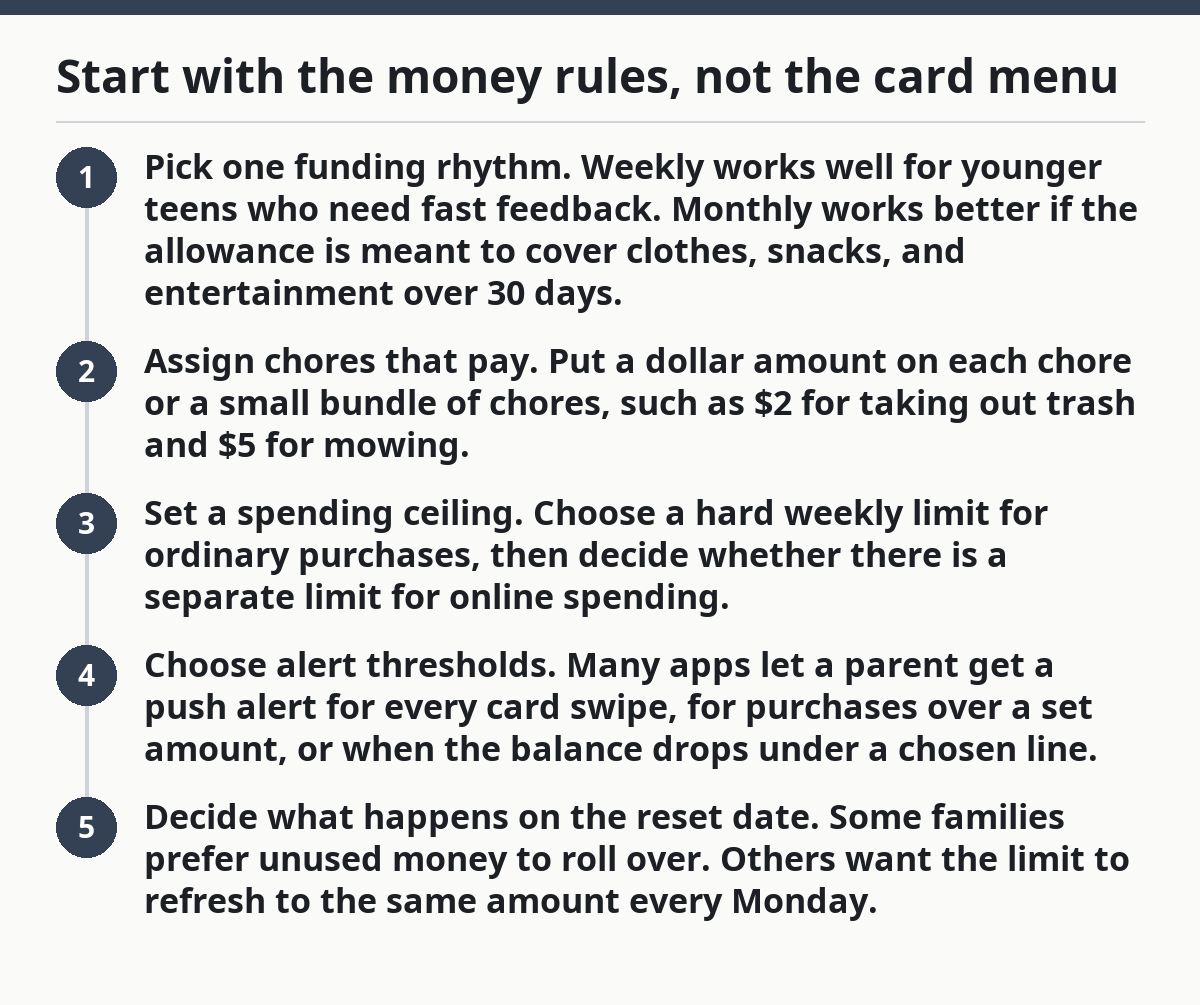
The most useful setup keeps the rules visible. If the teen can see a $20 weekly limit and a $10 chore payout in the same place, the card teaches habits instead of just moving money around.
For a broader view of the family money setup around this, the teen banking and spending accounts hub belongs nearby.
How do I set spending limits on a teen card?
Set spending limits by matching each control to a real-life use case, then test it with one small purchase before you rely on it. Most card apps let a parent choose a weekly or monthly limit, turn on alerts, and block categories such as gambling, alcohol, or ATM use. The exact labels vary, but the logic is the same. The CFPB’s budgeting guidance also supports using clear caps and category limits rather than one vague rule for everything. See https://www.consumerfinance.gov/consumer-tools/budgeting/
For related help, see the teen banking and spending accounts guide and the family budgeting tools page.
Use this order:
- Open the parent controls section in the card app and find the spending or limits tab. Expect categories such as “card purchases,” “online transactions,” “ATM,” or “cash access.”
- Set the main limit to a number that matches the child’s age and routine, such as $15 for small weekly spending or $50 for broader independence. The result should be a cap that resets on the schedule you choose.
- Choose which transaction types are allowed. Turn on in-store debit purchases if the teen needs snacks or lunch money, and turn off ATM withdrawals if cash is not part of the plan.
- Add merchant controls if the app offers them. A block on app stores, digital wallets, or specific merchant categories can stop impulse buying without freezing the whole card.
- Turn on alerts for every purchase or for any purchase over a threshold, such as $10. That gives you a live paper trail without hovering over every $2 transaction.
- Run a test transaction for a small amount, like $1 or $3, to confirm the limit, the alert, and the decline behavior all work the way you expect.
The right limit is not the lowest one. Too-tight controls create friction and teach the teen to work around the system with cash or favors. Too-loose controls turn the card into a blank check. The useful middle ground is a limit that covers ordinary spending but still makes the teen pause before a bigger purchase.
A good rule is to set the limit high enough for expected routine use, then let alerts catch the outliers. A $25 weekly cap with a $10 alert threshold is often more teachable than a $100 cap that never gets discussed.
Can allowance be sent to a teen card?
Yes, allowance can be sent to a teen card as a scheduled transfer, a recurring deposit, or a linked parent payout, depending on the app. The important part is that allowance should arrive automatically on the same day and at the same time so the teen learns to plan around a predictable reset.
This is where card setup turns from “money storage” into “money routine.” If allowance arrives randomly, the teen cannot tell whether a balance came from chores, gifts, or leftover funds. Automatic transfers solve that problem.
Set the allowance flow like this:
- Pick a schedule. Weekly works well for younger teens and for families using a $10, $20, or $30 cap. Monthly can work if the card covers bigger categories such as transportation or clothes.
- Choose the destination. Send the money to the teen card balance rather than a separate parent wallet if the goal is everyday spending practice.
- Name the transfer clearly. If the app allows memo text, label it “Allowance” rather than “Transfer.” That makes statements easier to read later.
- Keep it separate from chores. Allowance is regular money. Chore money is earned money. Blending the two muddies the lesson.
- Decide what happens if the balance is already full. Some cards will still deposit, while others may reject the transfer or hold it in the parent side. Know the behavior before payday.
The trade-off is simple. Auto-transfer teaches consistency, but it also removes some flexibility. If you want allowance to depend on behavior or grades, automatic scheduling can feel too rigid. In that case, a manual weekly transfer may fit better, though it takes more parent attention.
Do not make the allowance amount do every job. If it has to cover lunch, entertainment, phone games, and personal care, it stops being a lesson and becomes a patch for too many expenses.
How do chore payments work with a teen card?
Chore payments work best when each task has a fixed price and the payout lands within 24 hours of completion. A chore system attached to a teen card should feel closer to a simple payroll schedule than to a vague promise that “we’ll see.”
There are three common ways to handle it:
- Flat chore rate. A specific task pays a fixed amount, such as $3 for unloading the dishwasher or $8 for vacuuming the main floor.
- Point system. Each chore earns points, and points convert to cash once a week. This adds flexibility but makes the math less transparent.
- Bundle payout. Several chores count as one weekly package, such as “bedroom, trash, and pet care” for a single amount.
The cleanest setup for most families is the flat rate. It is easy to explain, easy to audit, and hard to argue with. If a chore is worth $5, the teen knows exactly what to expect. If the chore is incomplete, the payment does not post.
A practical process:
- Post the chore list in the app or on the fridge.
- Put a dollar amount next to each task.
- Choose one approval method: parent checkmark, photo upload, or same-day verbal confirmation.
- Move the payout to the teen card on a fixed day, such as Saturday morning.
- Keep the chore balance separate from the allowance balance if the app supports categories.
That separation matters because it teaches two different habits. Allowance says, “This is your spending money.” Chore pay says, “This money came from work.” Mixing them into one bucket can make the teen think all money arrives the same way.
The biggest mistake is paying late. A chore completed on Monday and paid the next Friday weakens the connection between work and reward. Late payment also makes the whole setup feel like a parent promise instead of a real system.
If the family wants the card to reinforce responsibility, chore money should move quickly. Even a 1-day delay is enough to blur the lesson.
Use parent alerts and automation rules to keep the card honest
Use parent alerts and automation rules to catch problems before they become arguments. Alerts tell the parent what happened. Automation rules decide what happens next. Together, they keep the card from turning into a guessing game.
The most useful alert types are:
- Purchase alerts for every transaction
- Alerts above a set amount, such as $10
- Balance alerts when funds drop below a set floor
- Category alerts for online, app, or cash withdrawals
Automation rules can do more work than most families expect. A good teen card setup often includes:
- Scheduled allowance transfers on the same day each week
- Chore bonuses after approved tasks
- Weekly reset of a spending cap
- Block rules for cash withdrawal, gambling categories, or specific merchant types
- Temporary boosts for field trips, school events, or travel weekends
The real advantage of automation is consistency. If a card keeps replenishing automatically after overspending, the teen never feels the limit. If a rule blocks everything except in-person purchases, the card may become useless for school clubs or digital subscriptions.
Check the following after the first week:
- Did the allowance post when expected?
- Did chore money arrive only after approval?
- Did the teen hit the spending cap too early?
- Were any alerts noisy enough to ignore?
- Was there a declined transaction that should have been allowed?
That last question matters. A good system should stop the wrong purchase, but it should not interrupt ordinary life every Tuesday. If the card keeps failing on lunch or bus fares, the limit is set too low or the category rules are too tight.
A note on finance trade-offs: a teen card is not a substitute for a full budgeting lesson, and it should not be used as a silent surveillance tool. The control settings work best when the teen knows what each one does and why it exists.
What usually goes wrong the first month?
The first month usually goes wrong because the rules are too vague, too strict, or too disconnected from real spending. The card itself is rarely the problem; the setup around it is.
Common mistakes include:
- Using one limit for everything. That makes everyday spending and emergency spending fight for the same dollars.
- Setting the weekly cap too low. The card declines useful purchases, which leads to frustration and workarounds.
- Paying chores irregularly. A $4 chore paid two weeks late teaches the wrong lesson.
- Not turning on alerts. Without alerts, the parent sees a low balance after the fact.
- Forgetting merchant blocks. A card may work fine at a store but still allow purchases the family never meant to permit.
Each mistake has a cost. A vague rule creates disputes. A tiny limit creates loopholes. Late chore pay weakens trust. No alerts mean no visibility. Missing blocks allow purchases that look harmless in the moment and annoying later.
The fix is usually not more complexity. It is a cleaner split:
- allowance for baseline spending,
- chores for earned money,
- a weekly limit for ordinary purchases,
- alerts for anything unusual.
One more honest limitation: this setup is not right for every family. If a teen is already disciplined with money, heavy controls can feel insulting. If a teen has a history of impulse buying, the family may need tighter merchant blocks and a lower daily cap than a weekly one. The settings should match the real behavior, not the ideal behavior.
If the card app offers too many controls, resist the urge to turn on all of them on day one. Start with 3 or 4 rules, then tighten only the parts that fail in real use.
A simple setup that works for most families
A simple setup works because it is easy to explain, easy to monitor, and easy to adjust. A practical teen card setup usually starts with a weekly allowance, a small set of paid chores, a visible spending limit, and alerts on every purchase.
Use this starting point:
- Allowance posts every 7 days
- Chore pay posts once a week after approval
- Spending limit resets each week
- Alerts go to the parent for every transaction over $5
- Cash withdrawal stays off unless there is a clear need
- Online spending stays on only if the teen regularly buys online
That arrangement gives the teen room to practice without letting the card become a free-for-all. It also gives the parent enough visibility to coach instead of police.
The setup is not finished on day one. After 2 or 3 weeks, adjust one setting at a time. If the teen keeps running out of money on day 2, raise the limit or separate lunch money from entertainment. If the teen never touches the card, the limit may be too restrictive or the allowance may be too small to matter.
The goal is not perfect control. The goal is a card system that teaches the teen how spending, saving, and earning fit together in real life.
How do parents set spending limits on a teen card?
Parents set spending limits in the card app by choosing a cap for purchases, then deciding whether cash withdrawals and online spending are allowed. The best setup uses a weekly or monthly amount that matches ordinary needs, plus alerts for transactions above a chosen threshold. A quick test purchase helps confirm the limit works before regular use.
Can allowance be sent to a teen card?
Yes, allowance can be sent to a teen card through an automatic weekly or monthly transfer. The most useful approach is to schedule it on the same day each cycle so the teen can predict the balance. Keep allowance separate from chore payments if you want the spending lesson to stay clear.
Drafted with AI; not yet reviewed by a person.