Last updated: November 20, 2026
Key Takeaways
- If someone else can read that email, they may be able to reach the money account next.
- Change the password first, then review recovery options.
- Use only recovery options you control, and check them after any money-account change.
- Treat unexpected login links, attachments, or “verify your account” messages as suspicious until confirmed real.
Teens with bank, card, or Cash App-style accounts need a safer email account first. How Teens Can Protect Their Email Used for Money Accounts starts with locking down the email before you trust it with money recovery, password resets, or alerts. The steps below show what to change, what to leave alone, and what will stop a thief fastest.
What email security has to do with money accounts
Picture this: you are trying to log in to a banking app, and the reset link lands in your inbox instead of the app. If someone else can read that email, they can often get to the money account next.
Email is the back door for password resets, security alerts, and recovery codes. That makes the email account part of the money account setup, not a side detail. A teen who uses the same inbox for school, shopping, and banking needs the same caution with all three.
The main goal is simple: keep control of the email account, the recovery phone, the recovery email, and the password. If any one of those is weak, the whole chain gets shaky. That is why the safest move is usually to secure the email account before chasing any other app setting.
A good place to anchor this is the FTC guidance on account security and phishing awareness, along with Google and Microsoft support pages on account recovery and security settings. Those pages change over time, but the advice stays steady: protect the account that receives the reset link.
- Email gets reset links.
- Email gets warning alerts.
- Email can confirm identity.
- Email can also be the weakest link.
What should I change first if my email may be compromised?
Change the password first, then the recovery options. If you think someone may already know your email login, the fastest fix is often to cut off easy re-entry paths.
Picture this: you see a sign-in alert you did not expect, or a password reset message you never asked for. You need to act in the first 10 minutes, not later tonight. The order matters because a thief who still has a recovery path can undo your work.
- Change the email password to a long, unique one stored in a password manager or written nowhere public.
- Sign out of all other sessions if your email service shows that option.
- Check the recovery phone and recovery email for anything you do not recognize.
- Remove strange devices, app passwords, or forwarding rules.
- Turn on sign-in alerts so the next login attempt is harder to miss.
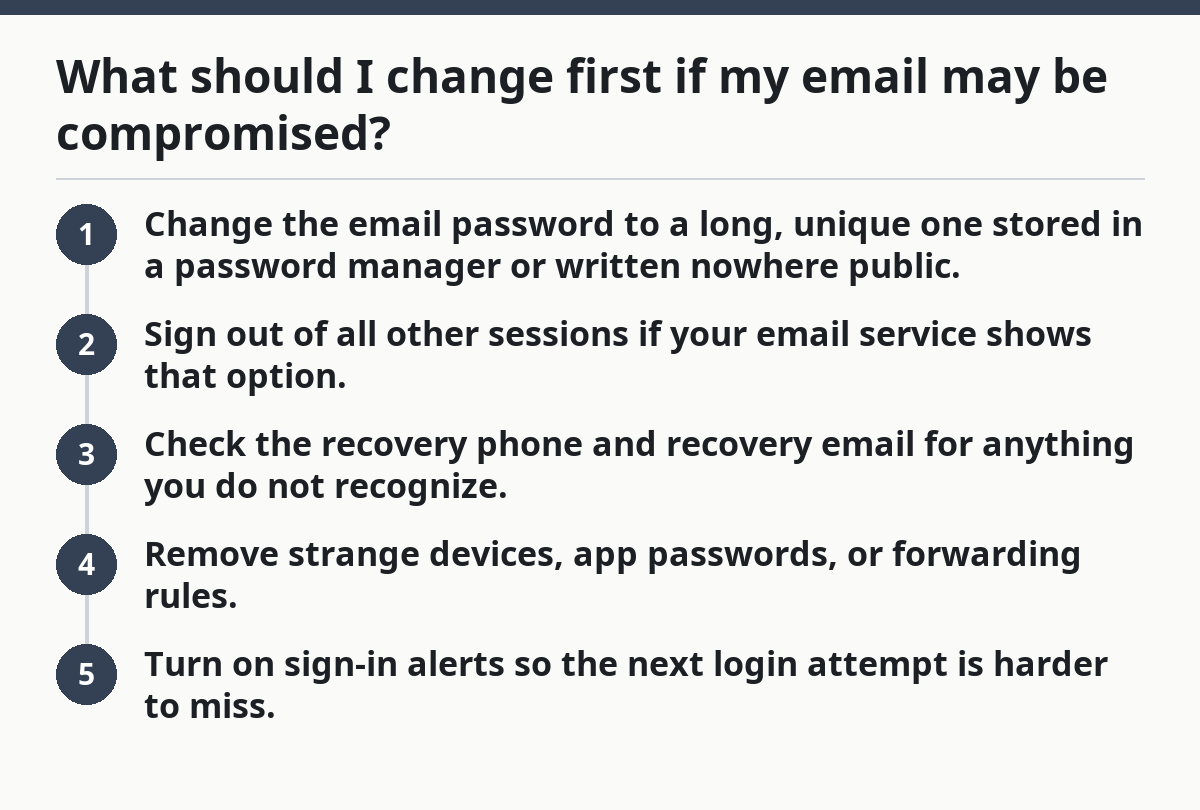
That sequence closes the easiest openings first. It also stops the common trick where someone changes the password, but leaves the old recovery phone attached.
If the inbox has been used to reset a bank, card, or payment app, change the money-account password too. Do not wait for the next day. The email may already be the path in.
How do I set up the right recovery options?
Use only recovery options you actually control, and check them every time you change a money account setting. A recovery phone that goes to an old number or a recovery email that no longer opens is worse than useless.
Picture this: you are in your email security page, and three settings sit there like loose bolts. Recovery phone, recovery email, and security questions if the provider still uses them. The fix is not fancy. It is careful.
Here is the clean setup:
- Use a recovery phone number that belongs to you and still receives texts.
- Use a recovery email account that is also protected, not the same weak password you reuse everywhere.
- Remove any phone number you do not recognize.
- Remove any backup email you cannot open yourself.
- Save the changes, then check for a confirmation email or alert.
A lot of people miss the weak point here: the recovery email is itself an email account. If that second inbox is easy to guess into, the first one is not really protected. Keep both secure, or keep neither.
Once the recovery details are clean, resetting a lost password gets easier for you and harder for everyone else. That matters if you lose a phone, switch numbers, or get locked out of a money app.
- Check recovery details after any phone change.
- Remove old school email addresses.
- Keep the backup inbox private.
- Revisit the settings after 1 day if the provider delays updates.
How can teens stop phishing from stealing money-account email?
Teens can stop phishing by treating every unexpected login link, attachment, or “verify your account” message as suspicious until proven real. Most email theft starts with a fake message, not a technical hack.
Picture this: your inbox shows a message that looks like your bank, but the sender name and the link feel off. The pressure is the trick. Phishing works because it asks for a fast click before you think.
Use this rule set:
- Do not click password reset links from a message you did not ask for.
- Go to the app or site by typing the address yourself.
- Check the sender address, not just the display name.
- Look for spelling errors, odd urgency, or “account closed today” threats.
- Never share one-time codes over email or chat.
A real bank or payment service usually does not ask you to prove yourself by replying to an email thread. If the message tells you to act now, slow down. A 30-second pause beats a stolen account.
If you already clicked, change the email password right away and review recent sign-ins. Then check the money accounts connected to that inbox. The link may have been fake, but the follow-up risk is real.
Which email alerts should teens keep on?
Teens should keep every security alert that warns about sign-ins, password changes, recovery changes, and money-account resets. These alerts are the early warning system for email account security.
Picture this: your phone buzzes with a login notice at 2 p.m. while you are in class or on the bus. That alert matters because it can show someone trying to reach your money accounts through your inbox.
Turn on alerts for:
- New sign-ins from unknown devices
- Password changes
- Recovery phone or recovery email changes
- Forwarding rule changes
- Money-account verification codes and reset notices
A good alert is not clutter. It is a heads-up. If a sign-in notice appears and you did not do it, change the password and review recovery settings fast. If a money app sends a reset notice you never asked for, check the email inbox first, then the app.
Do not ignore alerts because they “seem normal.” A lot of account theft looks boring at first. One missed message can lead to a reset link being used before you notice.
- Keep alerts on for both email and money apps.
- Use push alerts or text alerts if the provider offers them.
- Review any alert that mentions a new device or location.
- Treat repeated alerts as a sign to secure the account now.
What habits keep an email account safer every day?
Daily habits keep an email account safer by cutting off the simple mistakes that thieves depend on. A strong password helps, but habits keep the account from sliding back into danger.
Picture this: you are on a school laptop, a family tablet, and your own phone, all signed into the same inbox at different times. That setup is normal. It is also where mistakes grow if you never clean up old access.
Use these habits:
- Keep one unique password for the email account.
- Log out of shared devices after use.
- Review connected devices once a month.
- Keep recovery options current after a new phone number or new email address.
- Save backup codes in a place only you can reach.
If your email provider offers a security checkup, use it. That quick review often shows old sessions, weak recovery options, and account warnings in one place. It takes less time than recovering a lost inbox later.
The trade-off is simple: a little checking now saves a lot of account cleanup later. That is the whole point. Email for money accounts should be boring, predictable, and hard to touch.
Security rules that pay off
- One inbox for money recovery should be treated like a lockbox.
- Old numbers and old emails should not stay attached.
- Alerts should tell you when something changes.
- Shared devices should never stay signed in.
How this fits into a teen money safety plan
Email protection works best as part of the bigger teen money safety plan, not as a one-off fix. The email account sits under the money app, the bank, and the card, so it deserves the first check.
Picture this: you have already made your money app password strong, but the recovery email still has a weak password and an old phone number. That gap can undo the rest. The safest order is to secure the inbox, then the money accounts tied to it.
A simple plan looks like this:
- Lock the email account.
- Clean the recovery phone and recovery email.
- Turn on alerts.
- Watch for phishing.
- Review the money apps linked to that inbox.
That sequence matches the way account theft actually happens. Most people do the last step first and the first step last.
For a fuller map of teen money safety and scam response, I also point readers to the hub on teen online money safety and scam prevention. This page handles the email piece; the bigger guide covers the rest of the money-safety path.
Why does email security matter for bank accounts?
Email security matters for bank accounts because email is often the way a bank proves you are the account owner. If someone controls your inbox, they may be able to request password resets, read security notices, or intercept verification messages. That makes the email account a direct target, not just a side account.
What should I change first if my email may be compromised?
Change the email password first, then check the recovery phone and recovery email. If the attacker still has a recovery path, they may get back in after you leave. After that, review sign-ins, remove unknown devices, and look for forwarding rules or other settings you did not create.
How do I keep someone from resetting my money apps through email?
Keep the email account locked down, because that inbox is where many reset links and codes arrive. Use a unique password, clean recovery options, and turn on alerts for sign-ins and password changes. If a reset notice shows up that you did not ask for, treat it as a warning and check the money app right away.
Drafted with AI; not yet reviewed by a person.