Last updated: November 19, 2026
Key Takeaways
- Compare each feature separately, because teen accounts can look alike but work differently in practice.
- Start with control settings, since they determine who can do what on day one.
- Parental controls turn a basic spending account into a managed system.
- The main numbers to look for are monthly service fees and what waives them, if anything.
To compare teen account features before signing up, focus on the basics that change daily life: parental controls, debit card access, cash deposit options, transfer limits, and the bank app. This guide to How to Compare Teen Account Features Before Signing Up gives a quick answer: compare at least five features before opening an account. The right teen account is the one that matches how money moves in that family, not the one with the longest feature list.
Teen account features that decide the outcome
The most useful comparison is a feature-by-feature one, because a teen checking account can look similar on a homepage and still behave very differently in practice. A debit card, a bank app, and parental controls are the core pieces, but the details around transfers, cash deposits, and fees decide whether the account is usable day to day.
| Feature | What to compare | Why it matters |
|---|---|---|
| Debit card access | Can the teen use a card immediately, request a card, or use a digital wallet? | This affects how soon the account can be used for school, rides, and small purchases. |
| Parental controls | Can a parent lock the card, set spending alerts, approve transfers, or restrict merchant types? | Control features matter more than branding; they shape how much oversight is possible. |
| Cash deposits | Can cash be deposited at a branch, ATM, or retail location? Are there limits? | This matters if allowance, gifts, or side-job cash needs to get into the account. |
| Transfer options | Can the teen send money to family, friends, or another bank? Is person-to-person transfer included? | Transfer rules affect how quickly money can move out of the account. |
| Fee structure | Is there a monthly fee, replacement card fee, overdraft fee, or ATM fee? | A teen account can be simple and still cost money in the wrong situations. |
| Bank app | Does the app show balances in real time, offer alerts, and make transfers easy? | The app is where most families will actually manage the account. |
| Age rules | Is the account for ages 13–17, 14–17, or 13–18? | The age band can determine which features are available and when the teen can keep the account alone. |
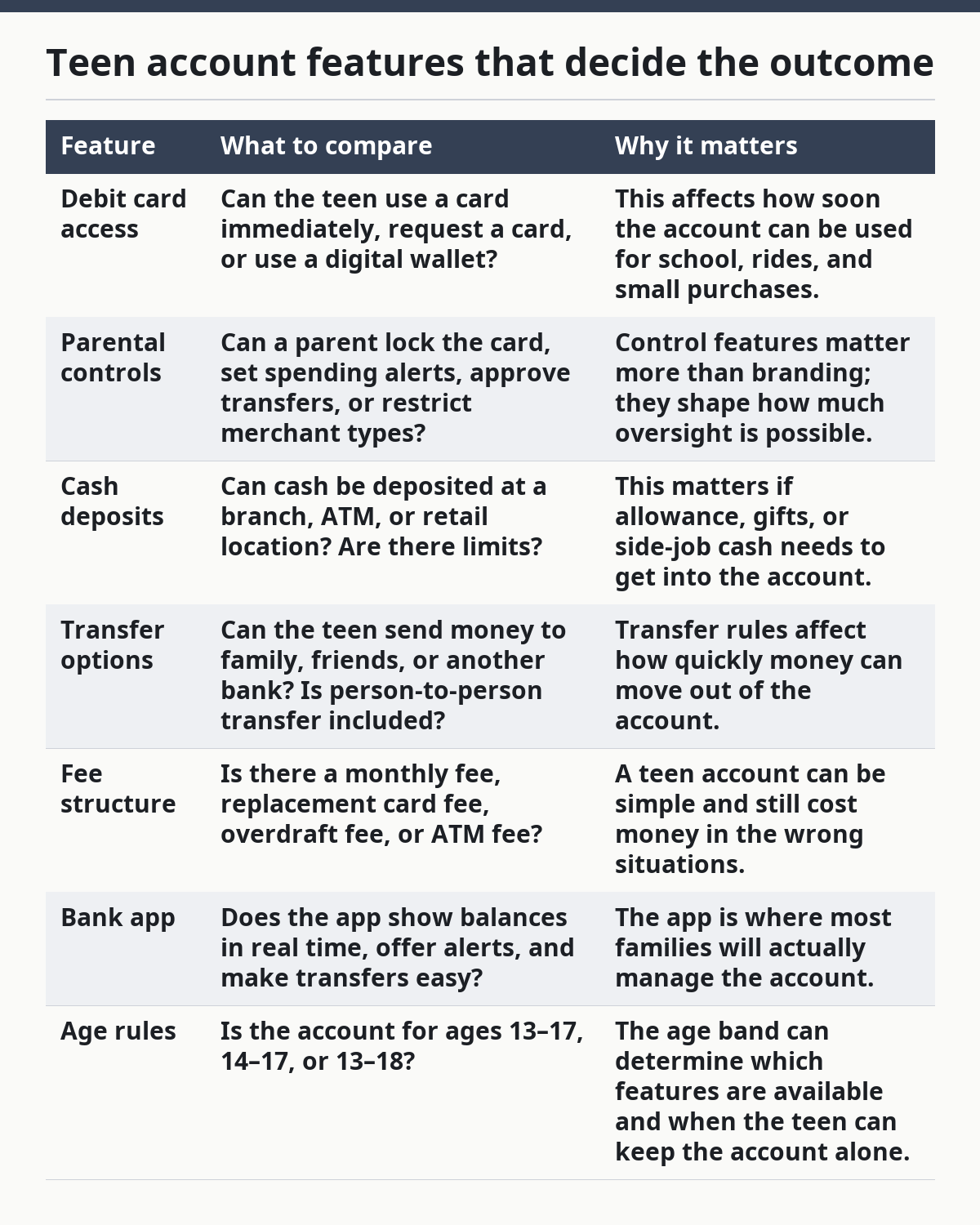
The biggest mistake is comparing only the card and ignoring control settings. A teen account with a good debit card but weak app controls can be harder to manage than a plainer one with strong oversight.
What should I check first when comparing teen account features?
Start with the account’s control model, because that tells you who can do what on day one. If the parent can freeze the debit card from the bank app, set alerts for every purchase, and approve transfers over a chosen amount, the account will feel very different from one that only shows balances. This first pass usually takes 10 to 15 minutes per account.
-
Open the feature list and find the account type. Look for words like “teen checking account,” “youth account,” or “student checking.” If the page does not clearly say the teen’s age range, stop there and look for the disclosure or help page. The result you want is a clear match, such as 13–17 or 14–17, before comparing anything else.
-
Check card access next. See whether a debit card is included, whether a card can be frozen in the app, and whether digital wallet support is available. A good sign is a direct mention of Apple Pay or Google Pay support, plus a clear path to request or activate the card.
-
Look for parental controls in the app description. The features that matter are card lock/open, spending alerts, transfer approval, and balance visibility. If the app only says “monitor activity,” that is vague; if it lists specific controls, you can compare it against another account line by line.
-
Move to cash deposits. Find out whether cash can be deposited at branches, ATMs, or retail partners, and whether there is a limit per deposit or per day. If a teen sometimes gets paid in cash from tutoring, babysitting, or a weekend job, this step can decide the account.
-
Check transfer options and limits. Look for transfers to another bank, peer-to-peer transfers, external account linking, and any daily or monthly caps. If the account has instant transfers or Zelle-style transfers, note whether the teen can use them or the parent has to initiate them.
-
Read the fee page last. Look for monthly service fees, overdraft or returned-item fees, ATM fees, replacement card fees, and foreign transaction fees if travel is relevant. The result you want is a list you can compare with another account in plain language, not a maze of fine print.
Two authoritative places to cross-check banking basics are the Consumer Financial Protection Bureau’s pages on banking and debit cards and the FDIC’s deposit account guidance. I would use those as background, then confirm the actual teen-account rules on the bank’s own disclosures or with a qualified financial professional.
How do parental controls change the account?
Parental controls change the account from a simple spending tool into a managed system. The strongest teen accounts let a parent see activity, set alerts, freeze the card in seconds, and sometimes require approval for transfers, while weaker ones offer little more than account viewing. That difference matters more than a stylish app icon.
The specific controls to compare are easy to miss because they are often buried under “family features” or “controls.” I would look for four items:
- Card lock/open in the app, not just by calling customer service.
- Spending alerts by transaction, merchant, or amount.
- Transfer controls that let a parent cap or approve outgoing money.
- Profile access for both teen and parent, so both can see what happened without sharing a password.
A parent-controlled account can be a strong fit for a 13-year-old or a first-time cardholder who needs guardrails. It is a poorer fit for an older teen who needs more independence, especially if the app requires too much parent intervention for ordinary spending. A family that wants to keep a weekly allowance under a fixed limit may like this model; a family that wants the teen to manage their own lunch money without oversight may find it annoying.
The trade-off is simple: more control usually means less flexibility. If the account makes every transfer a parent decision, the teen may feel blocked at the exact moment they need to learn ordinary money habits. If the controls are too loose, the adult may have little visibility until money is already gone. That is why the comparison has to focus on specific controls, not on whether the product is marketed as “family-friendly.”
What fees and limits should I compare on a teen checking account?
The fees and limits that matter most are the ones tied to everyday use, not the headline promise of “no monthly fee.” A teen checking account can still cost money through ATM charges, replacement card fees, transfer caps, or cash deposit limits, so the comparison needs to go past the front page.
The main numbers to look for are:
- Monthly service fee and what waives it, if anything.
- ATM fee policy, including out-of-network ATM charges.
- Debit card replacement fee, especially if the card is lost.
- Transfer limits, often daily or monthly.
- Cash deposit limits, if the account allows cash at all.
- Overdraft or negative-balance rules, if the account can go below zero.
A strong comparison method is to imagine three real uses: a teen buys lunch twice a week, gets cash gifts three times a year, and sends money to a parent once a month. If the account handles those with no surprises, it is practical. If the account charges for each of those actions or makes them awkward, the feature set is weaker than it first looked.
One common mistake is to dismiss small fees because they seem rare. A $3 ATM charge or a replacement card fee does not look large on paper, but it can matter more than a monthly fee if the teen loses a card once or uses cash machines often. Another mistake is to ignore limits. A transfer cap that is fine for a $20 allowance can be too tight for a teen who needs to move money for a class trip or a summer job.
This is also where a generic comparison article often goes wrong: it treats fees as a separate topic instead of part of the feature comparison. On a teen account, fees are features in disguise. They tell you what the bank expects the account to do and what it does not want to support.
Which bank app features are worth caring about?
The bank app matters most if it shows money clearly and gives fast control over the account. A teen account with a clumsy app is harder to use than one with fewer bells and whistles but a clear balance screen, instant alerts, and a simple card lock.
Compare the app on four practical points:
- Balance visibility. The balance should update quickly enough to avoid accidental overspending. If pending purchases are visible, that is better than showing only posted transactions.
- Alerts. Look for purchase alerts, low-balance alerts, and transfer notifications. If you can set thresholds, such as $25 or $50, the app is more useful.
- Navigation. A good app gets you to card controls, transfers, and deposit information in a few taps, not buried three menus deep.
- Teen-friendly access. The teen should be able to check the balance, see recent activity, and understand where the money went without needing a parent to translate every screen.
If the app includes deposit check scanning, that can be useful, but it should not outweigh the basics. A flashy rewards tab or money-savings graphic does not help if the teen cannot find the freeze-card button quickly. A solid app is quiet, direct, and predictable.
The downside of app-heavy banking is that it depends on a phone and decent connectivity. If a family wants an account that can work with limited smartphone access, the app-first model may not be the best fit. That is not a flaw for everyone, but it is a real limit worth noting before sign-up.
How do cash deposits and transfer options affect the comparison?
Cash deposits and transfer options determine whether the account fits real-world money, not just digital money. If a teen only gets direct deposits and card payments, these features matter less. If the teen gets birthday cash, tutoring cash, or occasional reimbursements, they matter a lot.
For cash deposits, ask exactly where the money can go. Some accounts allow branch deposits, some use ATMs, and some rely on retail cash networks. The difference is not cosmetic. A branch deposit is straightforward if the family lives near one, while a retail network can be inconvenient if the nearest location is 25 minutes away. If the account has a cash deposit limit, write that down too, because a limit of one amount per day can change how often deposits must be made.
For transfers, compare three paths:
- Between parent and teen
- To another bank
- To friends or family through peer-to-peer payment
The best setup depends on how the family moves money. A teen who gets a $30 weekly allowance may need easy parent-to-teen transfers more than peer-to-peer payments. A teen with a part-time job may care more about moving money out to another account. If the account supports external transfers but makes them slow or hard to set up, that is a practical drawback, even if the feature exists on paper.
A generic article often skips these details and says only that “transfers are available.” That is not enough. Availability is not usability. The better question is whether the transfer can be used from the teen’s profile, whether limits are reasonable, and whether cash can enter the account without a long detour.
The verdict: which teen account features matter most for each reader?
The best teen account features are the ones that match the family’s money flow, but the top priorities differ by reader. A first-time teen cardholder should favor card controls, alerts, and a clear app. A teen who handles cash should favor deposit options. A parent who wants oversight should favor transfer approval and card freeze tools.
Here is the straight verdict:
- For younger teens or first-time account holders: choose the account with the strongest parental controls and the clearest debit card settings. App alerts and a card lock matter more than extras.
- For teens who receive cash often: choose the account with the simplest cash deposit path and the fewest deposit restrictions. A weaker app is tolerable if cash can enter the account easily.
- For teens who move money between accounts: choose the account with good transfer options, clear limits, and easy external transfers. A generous debit card feature set matters less if transfers are awkward.
- For parents who want low-friction oversight: choose the account with real-time alerts, card controls, and visible transaction history in the bank app. If those tools are hidden or limited, the account will frustrate both sides.
The account to skip is the one that looks attractive but leaves one key job unfinished. A teen account with no clear cash deposit path is wrong for a cash-heavy family. An account with no usable parental controls is wrong for a family that wants guardrails. A polished app cannot make up for missing basics.
This comparison framework fits the bigger teen banking and spending accounts guide on the site, but the decision here should stay feature-based, not brand-based. If the account passes the checklist above, it is worth a closer look. If it fails on one feature that your family needs every month, keep moving.
What features matter most in a teen account?
Overall, the most important features are the ones you will use weekly: debit card access, parental controls, the bank app, transfers, and cash deposits. A teen account can look simple and still be a poor fit if one of those is missing. The right order depends on how the teen gets money and how much oversight the parent wants.
Should teens prioritize cash deposits or app controls?
Therefore, teens should prioritize cash deposits if they regularly receive cash from gifts, allowances, or side jobs. They should prioritize app controls if most money already arrives digitally and they need to track spending in real time. If both matter, compare which one works with fewer steps and fewer limits.
What account feature is easiest to miss?
Specifically, transfer limits are the easiest feature to miss. Many account pages mention transfers without showing how much money can move per day or month.
Drafted with AI; not yet reviewed by a person.